Invoice parsing & line-item categorization

Extract every line item from supplier PDF invoices, categorize each one against your GL or chart of accounts, and push the coded entry into your AP system.

How do you extract line items from PDF invoices and code them to the GL?

Run each supplier invoice through an AI PDF parser that returns the header (vendor, invoice number, date) and one row per line (description, quantity, unit price, amount). Map every line to a GL account and tax code with a rules table keyed on vendor and description. Lines that match no rule go to a review queue instead of being guessed, and the coded lines leave in your AP system's import format.

In Prowork by Parabola, an AI workspace for finance and operations teams, the extraction, the mapping table, and the review queue live in one Flow. AI handles reading the document; the coding rules stay explicit, so AP can see why each line landed in its account and change the rule when it is wrong.

Get a demo

The prompt

I want to automate invoice parsing. Build me a flow that extracts line items from supplier PDF invoices, categorizes each line against my GL or chart of accounts, applies the right tax code, and outputs a coded entry ready to push into my AP system.

Just copy and paste the prompt into a new Prowork flow to get started.
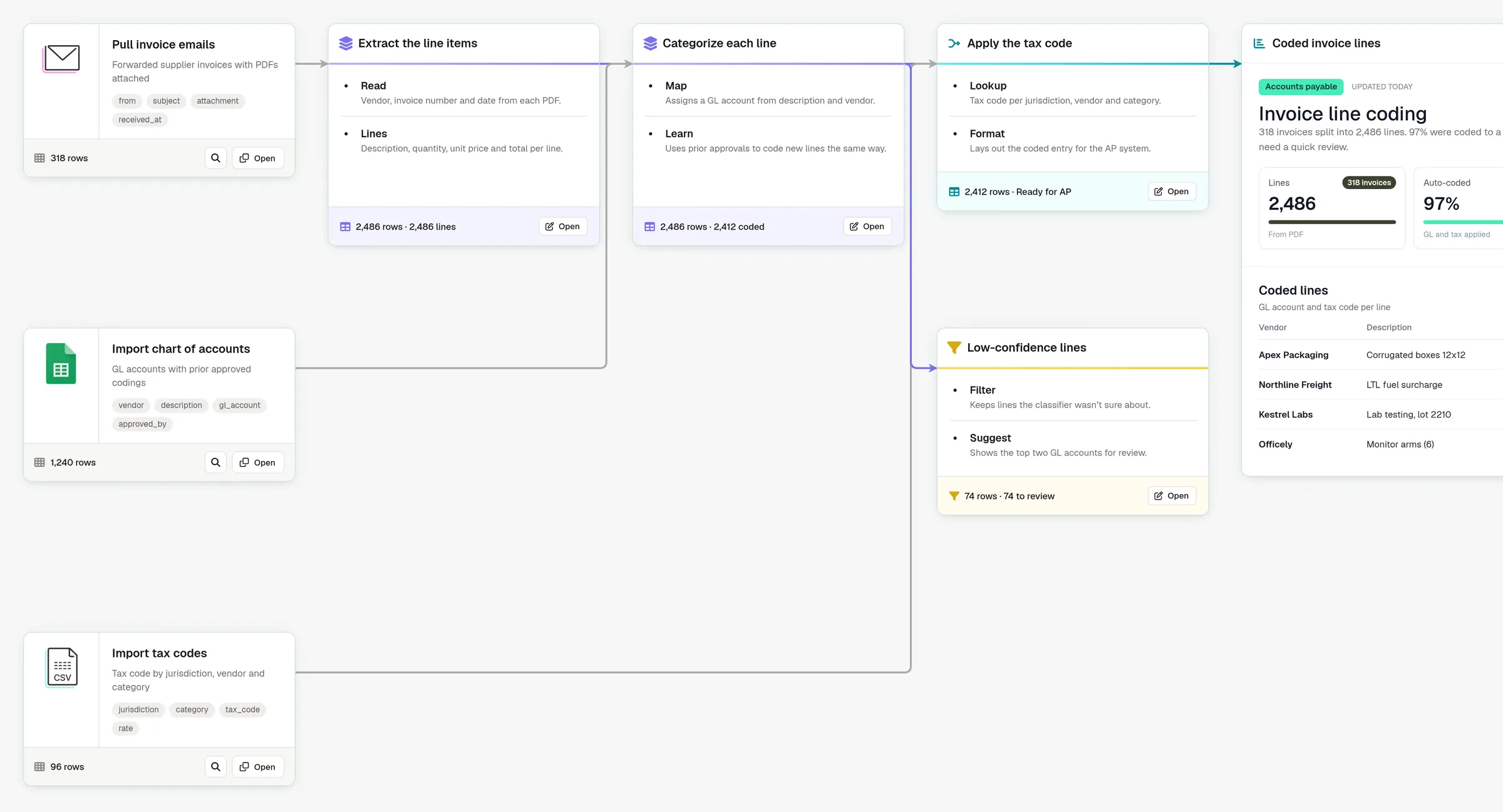
Prowork Flow that extracts invoice line items from emailed PDFs, codes each line to a GL account and applies tax codes

Worked example: one packaging invoice, five lines

A two-page PDF invoice from a packaging supplier arrives in the AP inbox. The Flow extracts five lines and codes them against the mapping table.

Line on the invoiceQtyUnit priceAmountGL accountTax codeStatus
Corrugated mailer box 12x9x41,000$0.62$620.005010 Packaging suppliesTaxableCoded by rule
Pallet stretch wrap 18in12$24.50$294.005010 Packaging suppliesTaxableCoded by rule
Custom print plate setup1$150.00$150.006420 Design and toolingTaxableCoded by rule
Fuel surcharge1$38.40$38.405200 Freight-inExemptCoded by rule
Rush handling fee1$75.00$75.00Review queue: no rule for this vendor and description

Illustrative data. Account numbers come from your chart of accounts. Once AP codes the rush fee, adding it to the mapping table means the next one codes by rule.

What Prowork builds for invoice parsing and categorization

A workflow with six steps you can edit:

1. Receive the invoice. Forwarded supplier email, uploaded PDF, or a pull from a supplier portal. The flow handles any of them.

2. Extract the line items. The AI step pulls vendor, invoice number, date, line description, quantity, unit price, and total per line.

3. Categorize each line. Map description and vendor to your GL accounts with a mapping table. When AP confirms a new coding, it goes into the table.

4. Apply tax code. Lookup per jurisdiction, per vendor, per category.

5. Validate against PO and receiving. Optional step that ties each line to the matching PO line and any receiving record.

6. Output the coded entry. A file ready to push into Concur, Bill.com, NetSuite, or whichever AP system the team uses.

What is invoice parsing and line-item categorization?

Invoice parsing pulls the individual charge lines out of a supplier invoice: description, quantity, unit price, total. Categorization is what happens next: assigning each line to the right GL account and tax code so the invoice can be posted rather than just read.

Line level is the point. An invoice total tells you what you owe; the lines tell you what you bought, and only the lines can be coded to different accounts, matched against a purchase order, or rolled into spend analysis. A ten-page freight invoice with surcharges and broker fees might touch four accounts.

AP owns the coding, and the accuracy compounds. Every line coded by rule instead of by habit is a line that reports correctly for the rest of the year.

Why teams stop parsing invoices manually

Every supplier sends invoices differently. A line invoice from a 3PL is different from a service invoice from an agency, different again from a freight invoice that runs ten pages with surcharges, fuel adjustments, and customs broker fees.

The AP team opens each one. Reads it. Types the line items into the AP system. Looks up the right GL account. Applies the tax code. Sends it for approval. Multiply that by hundreds of invoices a month and AP is the bottleneck.

What gets dropped is the line-level coding. Teams give up and code the whole invoice to one GL account, losing the visibility finance wants. Or they batch the work and let invoices stack up past their net-30 window, which is how vendors stop accepting the relationship.

The fix is to keep humans on the judgment work, not the typing. The flow extracts, categorizes, and codes. AP reviews exceptions and approves the file. The clean lines hit the AP system without anyone having to retype them.

How it works

Step 1. Paste the prompt.

Open Prowork, paste the prompt in section 2, and let it ask follow-up questions about your supplier mix, your chart of accounts, and how strict the line-level coding needs to be.

Step 2. Connect your data.

Invoice inbox or supplier portal, your chart of accounts, the GL mapping table, and your AP system.

Step 3. Run it on every invoice.

New invoice arrives, the flow extracts and codes it. The clean ones push straight into AP. The ambiguous ones land in a review queue.

FAQ

Does this work for invoices that are scanned, low-quality PDFs?

Yes. The AI step reads scanned PDFs. Cleaner inputs give cleaner output, and low-confidence lines land in the review queue instead of being posted.

Can the flow learn supplier-specific patterns?

Yes, through the mapping table. When AP confirms a coding, add the supplier, description, and GL account as a rule, and the next invoice from that supplier codes by rule instead of by guess.

What about multi-page invoices with surcharges and adjustments?

The flow handles multi-page invoices natively. Each surcharge, fuel adjustment, or accessorial gets its own line with its own GL code.

Can it write directly into Concur, Bill.com, or NetSuite?

Yes. The output format matches the import spec for whichever AP system you use. Some teams push it via API, others drop a CSV.

How is this different from Concur's native OCR?

Concur's OCR is good at reading. The flow is good at categorizing. The combination of extraction plus line-level GL coding is the part most teams build by hand.
Code every line, not just the invoice total.
Paste the prompt, point it at your invoice inbox and your chart of accounts, and let the categorization run on its own.
Start for free